How to choose a movie catalog app for your collection
A collection of a few dozen movies is easy enough to navigate. Over time, though, you add TV series, adaptations, different versions of the same work and films that share characters. Eventually, you want a way to bring it all together.
A spreadsheet is often the first solution. It is convenient for recording titles, years and directors, with a few columns of your own. But once you want to keep cast lists, character images, seasons and episodes, one row per movie no longer feels sufficient. That is when the question arises: which movie catalog app should you choose?
Before comparing apps and services, think about what you want your collection to be.
1. What exactly do you collect?
For a DVD or Blu-ray collector, edition details matter: region codes, audio tracks, packaging condition and shelf location. For a collection of files, it may be disk location, resolution, format and subtitles. Others are more interested in the films themselves: who made them, which characters appear and how they relate to other works.
These needs can overlap. However, an app that is excellent at tracking discs may not let you describe characters in detail. Conversely, an extensive film page is not much help if your main task is finding a case on one of twenty shelves.
Start with a simple question: what do you want to find in your collection a year from now? A particular edition? All the Star Wars films and series? A director's work? Or different portrayals of the same character?
Your answer will help identify the features you actually need.
2. How long does adding a movie take?
This may seem a less exciting question, but it often determines whether a collection keeps growing. A detailed movie page looks appealing until you have to enter titles, dates, countries, actors and roles by hand for every film. For a few favorites, that can be enjoyable. For several hundred, it becomes substantial work.
Fetching information automatically makes it easier to start. But check more than whether there is an Add button. Does the app find the right movie? Can it distinguish an original from a remake? Can you review and correct the suggested data? Can you choose what goes into your collection?
In flickollect, you can start adding a movie with an IMDb link or ID. You can review the prepared information before saving, including cast members and characters. This gives you a populated movie page to build on with whatever matters to your collection.
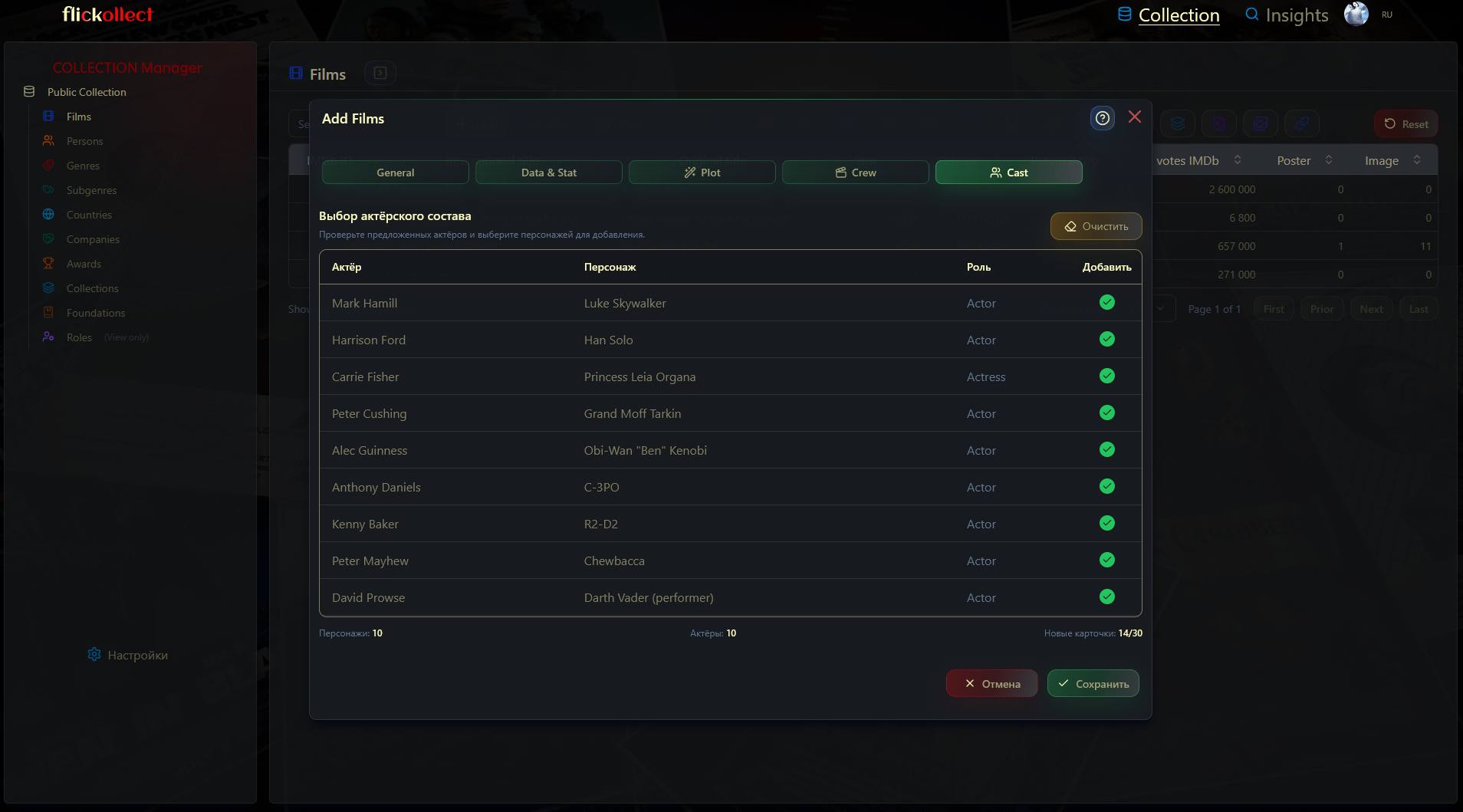
Automatic entry still needs checking. External sources can have gaps or conflicting information, and they can sometimes be unavailable. It helps when the app tells you about this and lets you correct information manually.
3. Can you organize the collection your own way?
Release year, country and genre help you find films, but rarely cover everything a collector cares about. A fictional universe, adaptations of one author's works, films about sea voyages or favorite comedies — everyone gradually develops their own ways of grouping movies.
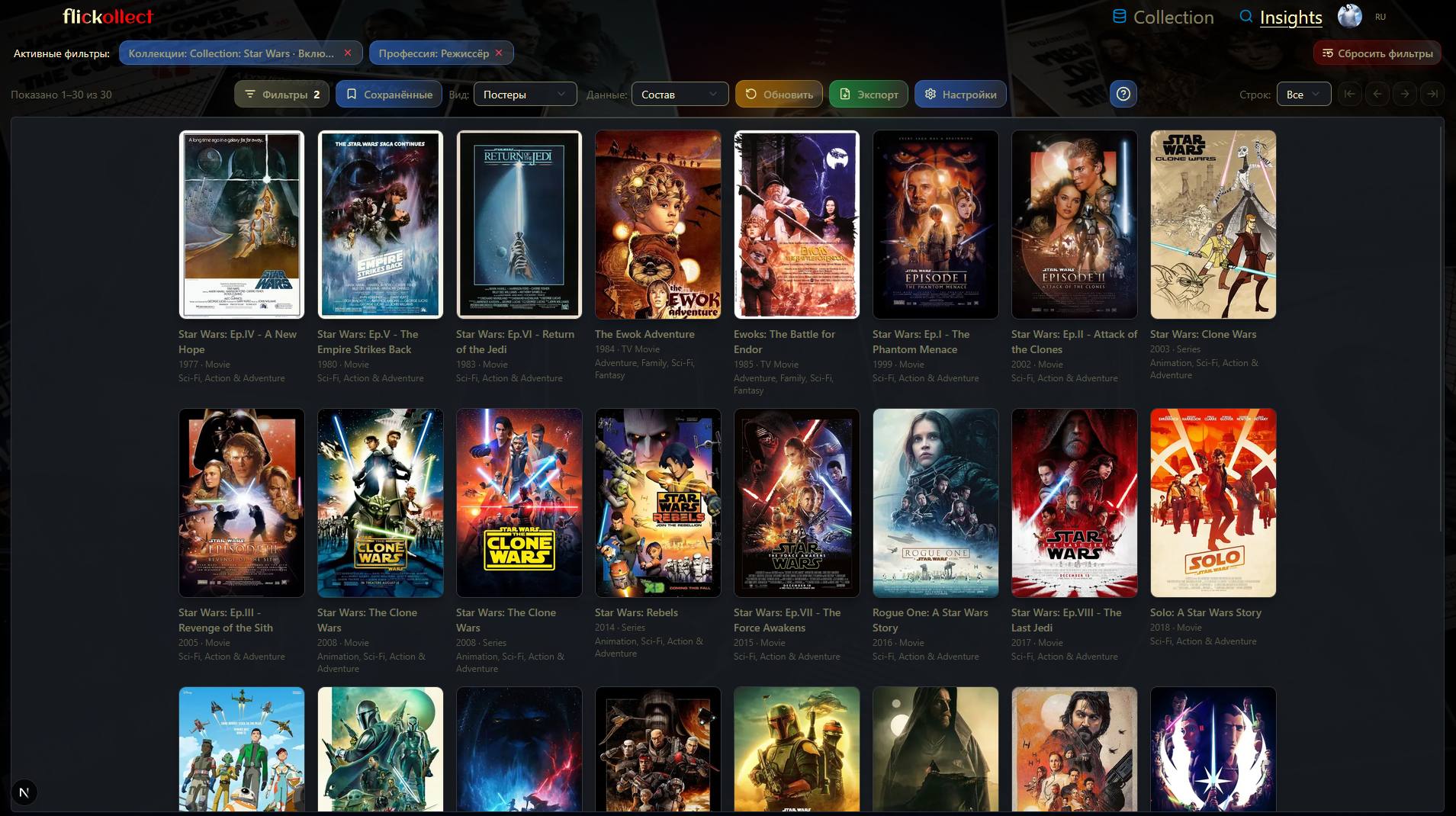
Check whether you can create these selections and include a film in more than one. For example, A New Hope could belong to both a Star Wars collection and your selection of space adventures, without requiring two independent records for the same movie.
Then try finding something within that selection. Can you combine conditions easily? Is it clear which filters are active? Can you switch from a wall of posters to more detailed information?
In flickollect, Insights supports this kind of exploration. You can select a Star Wars collection and display it as posters or detailed cards. Judge it against your own needs: how quickly can you find the selection you want, and how easy is it to explore?
4. How much detail can you keep about a film?
For some collectors, a poster, synopsis and a few key contributors are enough. Others want a full cast list, characters and their images. For TV series, information about seasons and individual episodes may also matter.
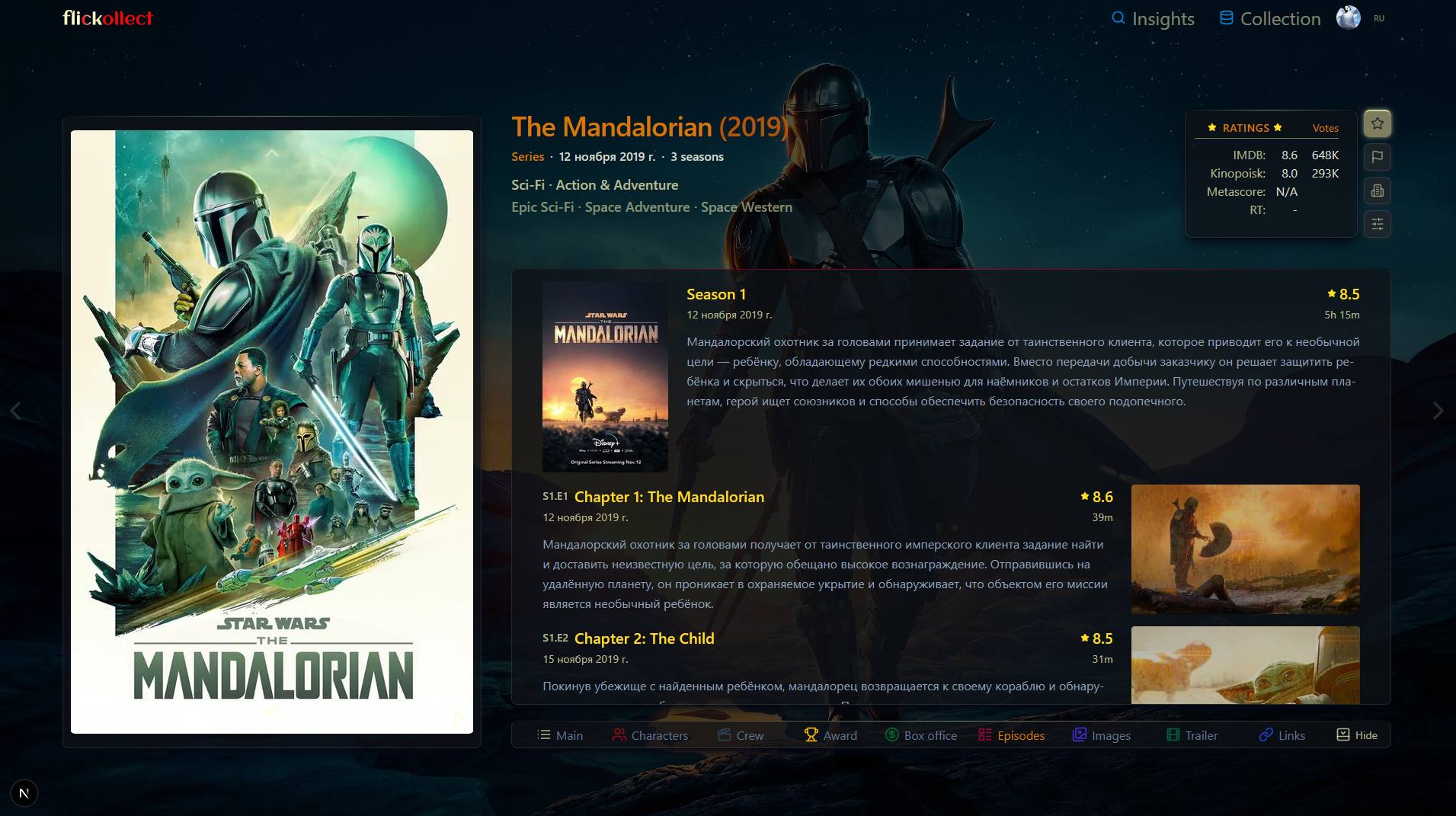
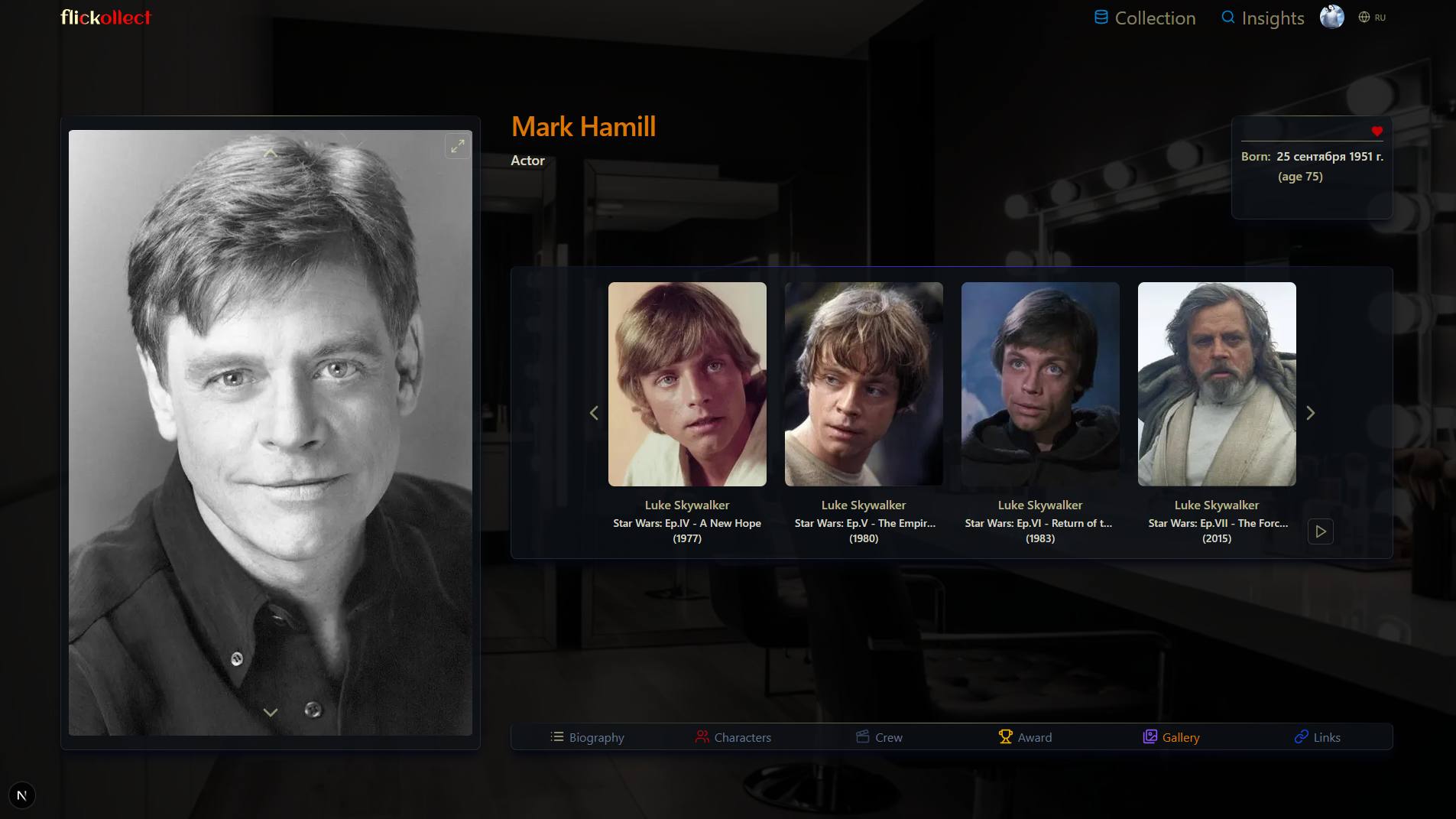
The distinction between an actor and a role is a useful example. A portrait of Mark Hamill tells you who appeared in the film. An image of Luke Skywalker shows who he played and what the character looks like in that particular movie. For a collection focused on characters and their portrayals, that is a meaningful difference.
In flickollect, you can keep character images linked to particular films and view them on the actor's page. A dedicated editor lets you prepare each portrait by selecting an area of the source image, adjusting the composition and checking the preview.
5. A collection as a resource for reviews and research
If you write about cinema, make video essays or explore a particular genre, your collection can serve as a working reference catalog. Bring together the films relevant to a project and keep information about their creators, characters and images at hand.
For an article about space science fiction, for example, you could create a themed selection and then use Insights to narrow it by release period, genre or the involvement of a particular director or actor. Save the selection settings to return to them as you work. You can also export information about the selected films to Excel for further work in a spreadsheet.
Another approach is to follow how a character's appearance changes on screen. On Mark Hamill's page, you can compare images of Luke Skywalker from different films: his appearance, costume and the character's age. This provides a starting point for your own observations and for choosing scenes to revisit while preparing a review or video.
The completeness of any selection depends on what is in your collection: a filter cannot find a movie you have not added or information missing from its record. Before publishing, check facts against sources and base conclusions about acting, direction and character development on watching the works themselves.
6. Where will you use your collection, and how will you keep your data?
For a desktop app, check operating system support, offline use and backup procedures. For a web service, consider access from your devices, reliance on an internet connection and data storage terms. In either case, find out who can see the collection and which actions remain under your control.
If you already have a catalog, look into transfer options separately. The word “import” does not guarantee that your selections, images and links between records will transfer. The same applies to export: understand exactly what you can download and how useful it will be elsewhere. Test these capabilities before building a large collection.
7. A short trial before you choose
It is easier to make a final choice with a small practical example. Take a few familiar films and one TV series, then run through this checklist:
- Add a movie automatically and correct one of the suggested entries.
- Create a themed selection and add several films to it.
- Find the films you want using a combination of filters.
- Explore how actors, characters, seasons and episodes are presented.
- Open the collection on the device you plan to use.
- Check the selected plan's limits, storage terms and data export options.
Familiar films are especially useful for this trial: you will notice missing details and awkward organization more quickly.
Consider flickollect if you want a detailed collection of information about cinema: films, people, characters, images and themed selections. To try this approach in practice, follow How to organize your movie collection.
Choose a movie catalog you will want to keep using after the first ten films. The number of fields matters, but it matters more whether you enjoy filling them in — and can later find what made collecting them worthwhile.
Read about flickollect's features in the service overview. For devices and access requirements, see the FAQ.